Loading Data from CSV into DB in Pentaho Data Integration is very easy because the 3 things are required
- A Created Table
- Text File Input/CSV Input Component
- Table Output
Now, what if we don’t have a table created and we tried loading CSV into a Table then it will fail but what if I told you we can, So when we read our CSV data with the Text File Input/CSV Input it tends to create a MetaData of the CSV.
Hence we can use that to our advantage here and create a SQL CREATE File and then use a Job SQL Component which has the ability to RUN a SQL file created from the Metadata.
Below is an overview of the whole JOB
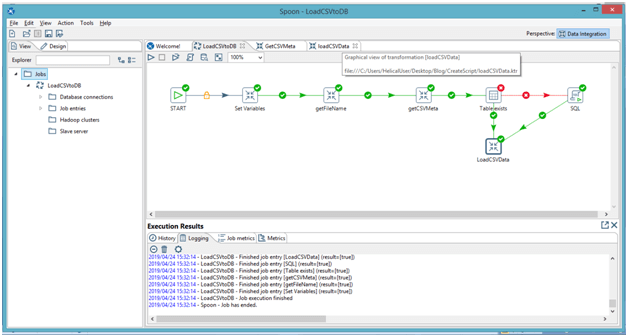
- getFileName: To the filename and use to that for tableName
- getCSVMeta: We use the Meta Data to create a SQL CREATE File
- Putting the file path
- Getting fields from the CSV
- LoadCSVdata: perform a Load CSV Data into Table
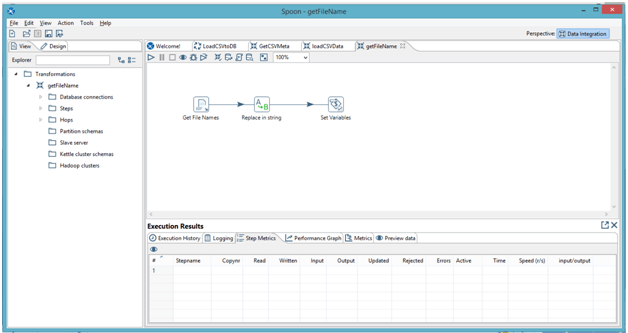

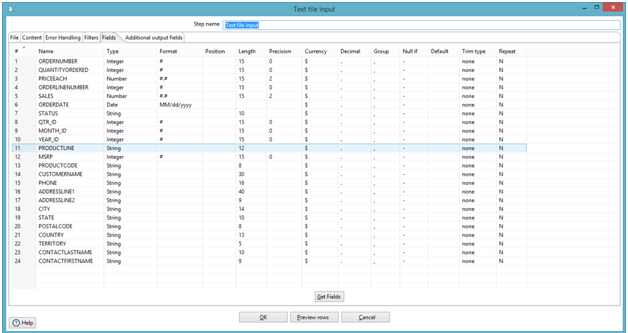
The Manual work you might have to do is this:

Below is the Code in the Modified JavaScript
// get instance of RowMetaInterface, which represents metadata of your input row:
var rowMetaInterface = getInputRowMeta();
// get List of ValueMetaInterface objects, which represent each of your input fields:
var valueMetaList = rowMetaInterface.getValueMetaList();
// get this object to be able to iterate over the list:
var iterator = valueMetaList.iterator();
//Alert(valueMetaList);
var filename = getVariable("TABLENAME", "notablename");
var tablename = filename.replace(".csv","");
setVariable("TABLENAME",tablename, "r");

var allFieldsName = [];
var allFieldsType = [];
var allFieldsLent = [];
var allFieldsTpre = [];

while (iterator.hasNext()) {
    // get current ValueMetaInterface object:
    var valueMetaInterface = iterator.next();
    // The name of current field:
    var fieldName = valueMetaInterface.getName();
    // getType() returns just an internal integer number of the type:
    var fieldLength = valueMetaInterface.getLength()
    //Alert(fieldLength)
    var typeIndex = valueMetaInterface.getType();
    //Alert(typeIndex)
    // typeName will hold the actual String name of the type:
    var typeName = org.pentaho.di.core.row.ValueMetaInterface.typeCodes[typeIndex];
    //Alert(typeName);
    var typePrecision = valueMetaInterface.getPrecision();

    // wrap Java String into a JavaScript String object to be able to convert them into Json
    allFieldsName.fieldName = String(fieldName);
    allFieldsName.push(String(fieldName));
    allFieldsType.fieldType = String(typeName);
    allFieldsType.push(String(typeName));
    allFieldsLent.push(String(fieldLength));
    allFieldsTpre.push(String(typePrecision));

}
var createScript = "Create Table " + tablename +" (";

for (var i = 0; i < allFieldsName.length; i++) {
    if (allFieldsName[i] != "RowNumber") {
        var prec = "";


        if (allFieldsTpre[i] > 0) {
            if (i == allFieldsName.length-2) {
                prec = "(" + allFieldsLent[i] + "," + allFieldsTpre[i] + ")";
            } else {
                prec = "(" + allFieldsLent[i] + "," + allFieldsTpre[i] + "),";
            }
        } else if (allFieldsTpre[i] < 0 || allFieldsType[i] == "Integer") {
            if (i == allFieldsName.length-2) {
                prec = "";
            } else {
                prec = ",";
            }
        } else {
            if (i == allFieldsName.length-2) {
                prec = "(" + allFieldsLent[i] + ")";
            } else {
                prec = "(" + allFieldsLent[i] + "),";
            }
        }
        var DataType;
        if (allFieldsType[i] == "String") {
            DataType = "Text";
        } else if (allFieldsType[i] == "Number") {
            DataType = "Numeric";
        } else if (allFieldsType[i] == "Integer") {
            DataType = "BIGINT";
        } else {
            DataType = allFieldsType[i];
        }
		//Alert(i);
		//Alert(allFieldsName.length - 1);
        createScript += "\n" + allFieldsName[i] + " " + DataType + prec;
		if (i == allFieldsName.length-2) {
			createScript +=  "\n" + ")";
		}
    }
} //THIS ABOVE CREATE SCRIPT IS FOR A POSTGRES DB
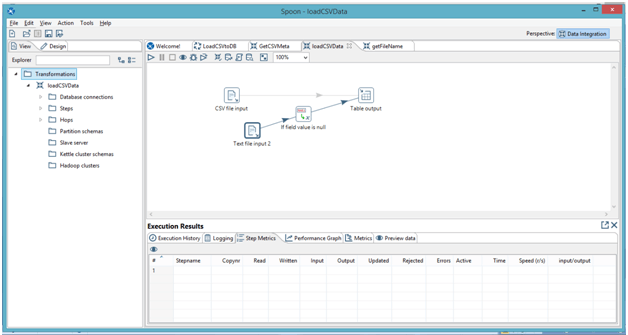
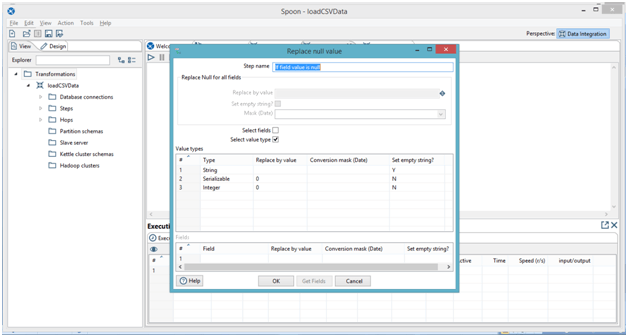
I use an if field value is NULL, to replace values (not advisable but when you have data that has lots irregularity then I kept that )
In case if you have any queries please get us at support@helicaltech.com
Thank You
Sohail Izebhijie
Helical IT Solutions Pvt Ltd

Best Open Source Business Intelligence Software Helical Insight Here

A Business Intelligence Framework
Best Open Source Business Intelligence Software Helical Insight is Here